LinkedIn Auto Apply — Submit LinkedIn Easy Apply Jobs Automatically with AI
Install the LoopCV Chrome extension, select the LinkedIn Easy Apply roles you want, and our AI auto-applies on your behalf. Full control — you choose every job, we handle the submission.
Not sure how to connect our linkedin auto apply plugin? Contact our team to learn more.
Advanced job search preferences
Elevate your Workflow with our LinkedIn extension.
- Simplify your workflow by automating this time-consuming task effortlessly.
- View detailed summaries of application attempts for quick review and follow-up.
- Answer questions interactively, allowing the chrome extension to fill in job application details seamlessly.
Discover the power of our LinkedIn extension in optimizing your job application processes.
From automated form filling to comprehensive summaries and interactive questionnaires, our chrome extension empowers you to streamline tasks and achieve more with every job application. Revolutionize your workflow and experience efficiency like never before.
Getting Started with LinkedIn auto apply (Loopcv Extension)
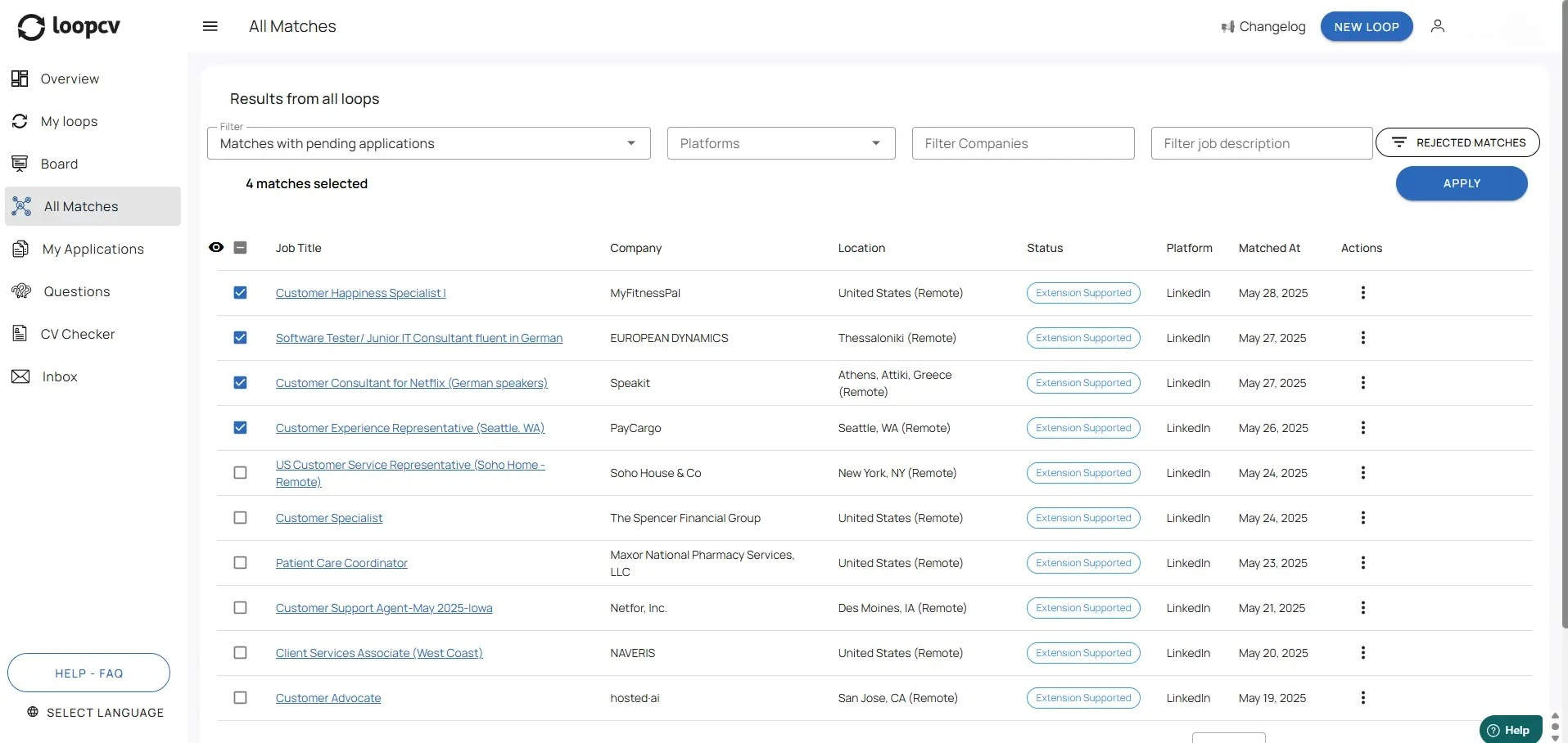
Filter and Find Extension-Supported Matches
Head to the All Matches section in your dashboard and apply the 'Matches with Pending Applications' filter. This will help you easily spot jobs labeled as Extension Supported. Browse through the list, choose the opportunities that interest you the most, and click Apply to move forward with the linkedin auto apply bot powered by our linkedin AI tool.
Start today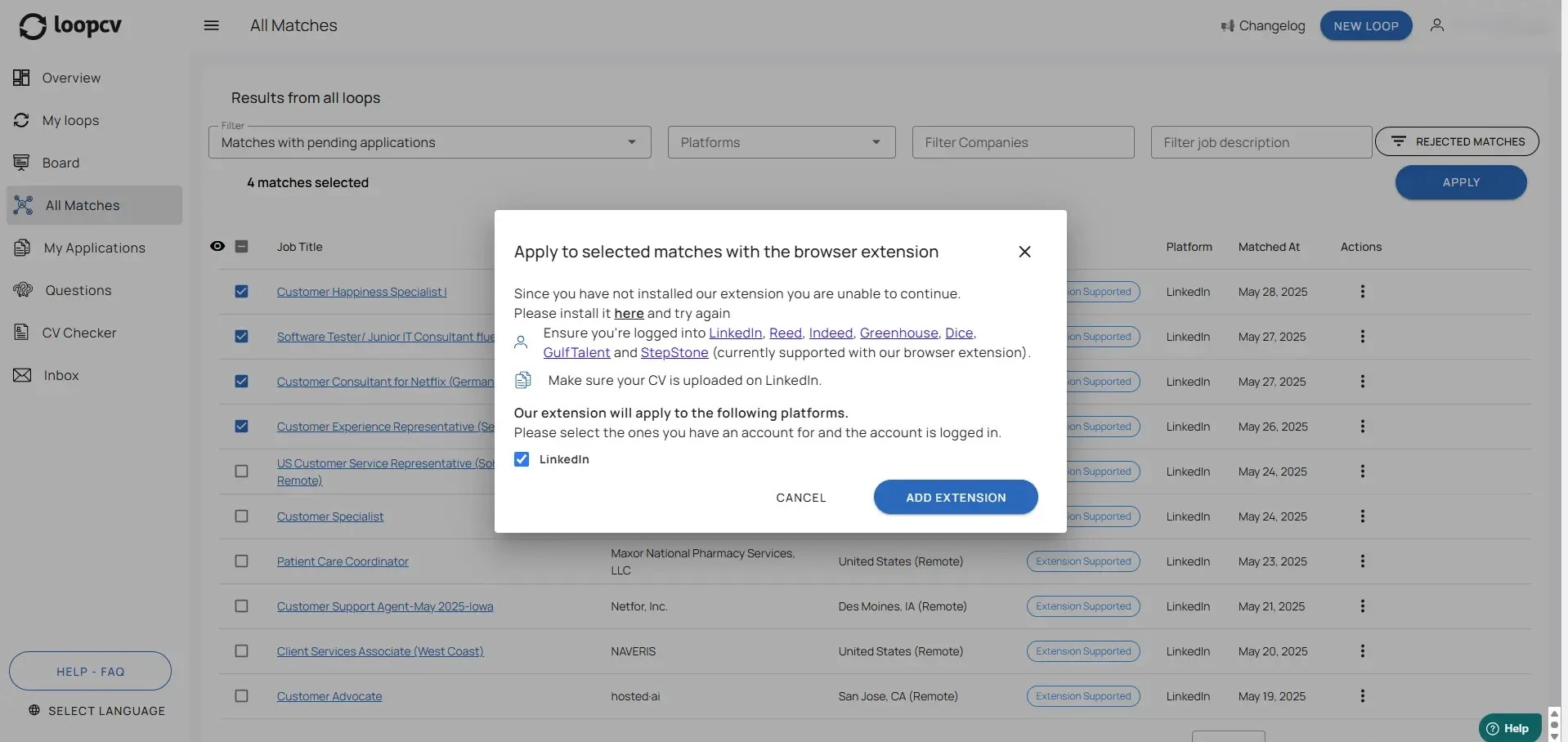
Follow the Setup Instructions
Once you click Apply on an Extension Supported job, a pop-up will appear with everything you need to get started. It will guide you through the necessary installations and let you know which job platforms you need to be logged into in order to use the extension smoothly with the linkedin auto apply bot and our linkedin AI tool.
Start today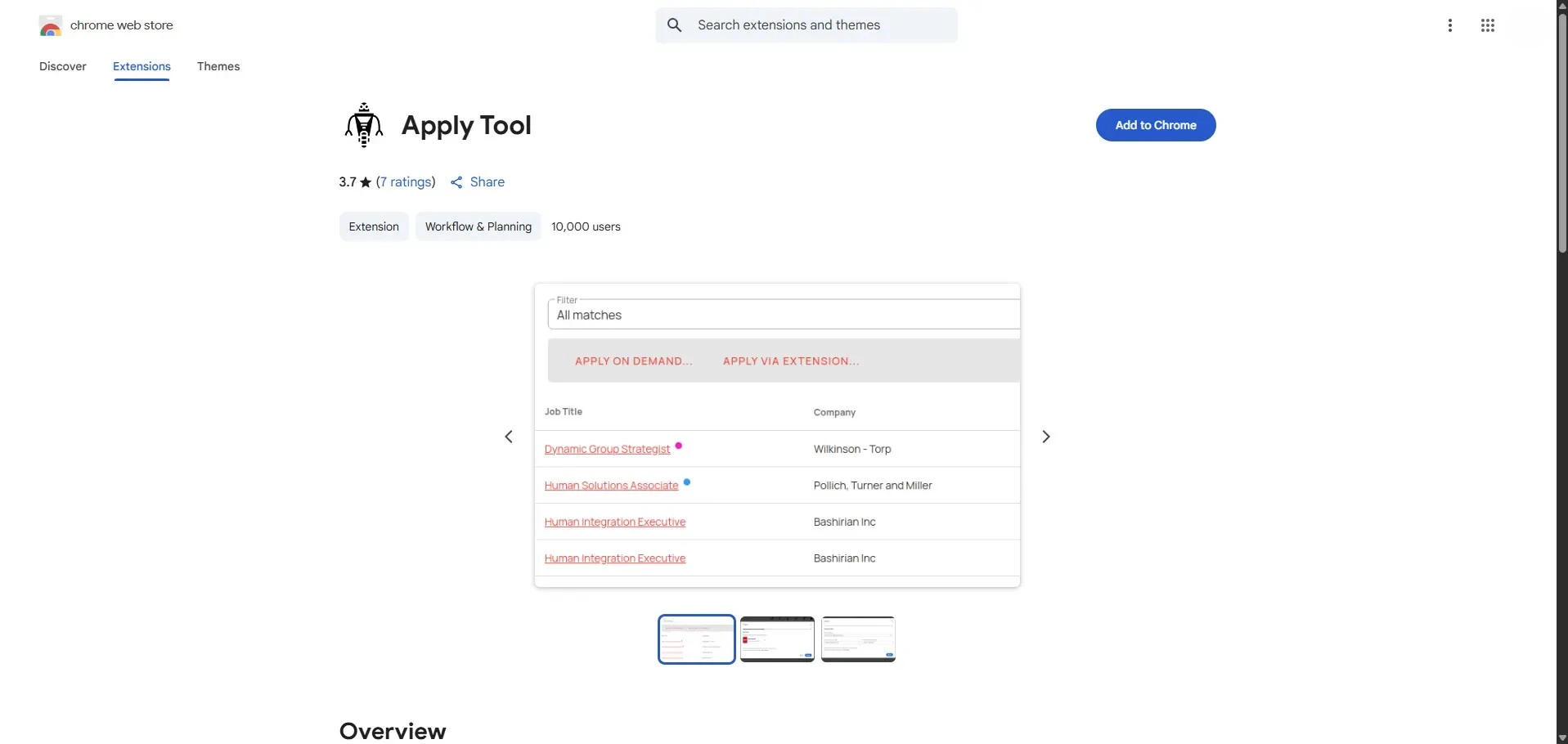
Add the Extension to Chrome
You’ll be redirected to the Chrome Web Store page. Simply click “Add to Chrome” to install the Loopcv extension to your browser. It only takes a few seconds and sets you up for automated job applications directly from your dashboard with the linkedin auto apply bot and our linkedin AI tool.
Start today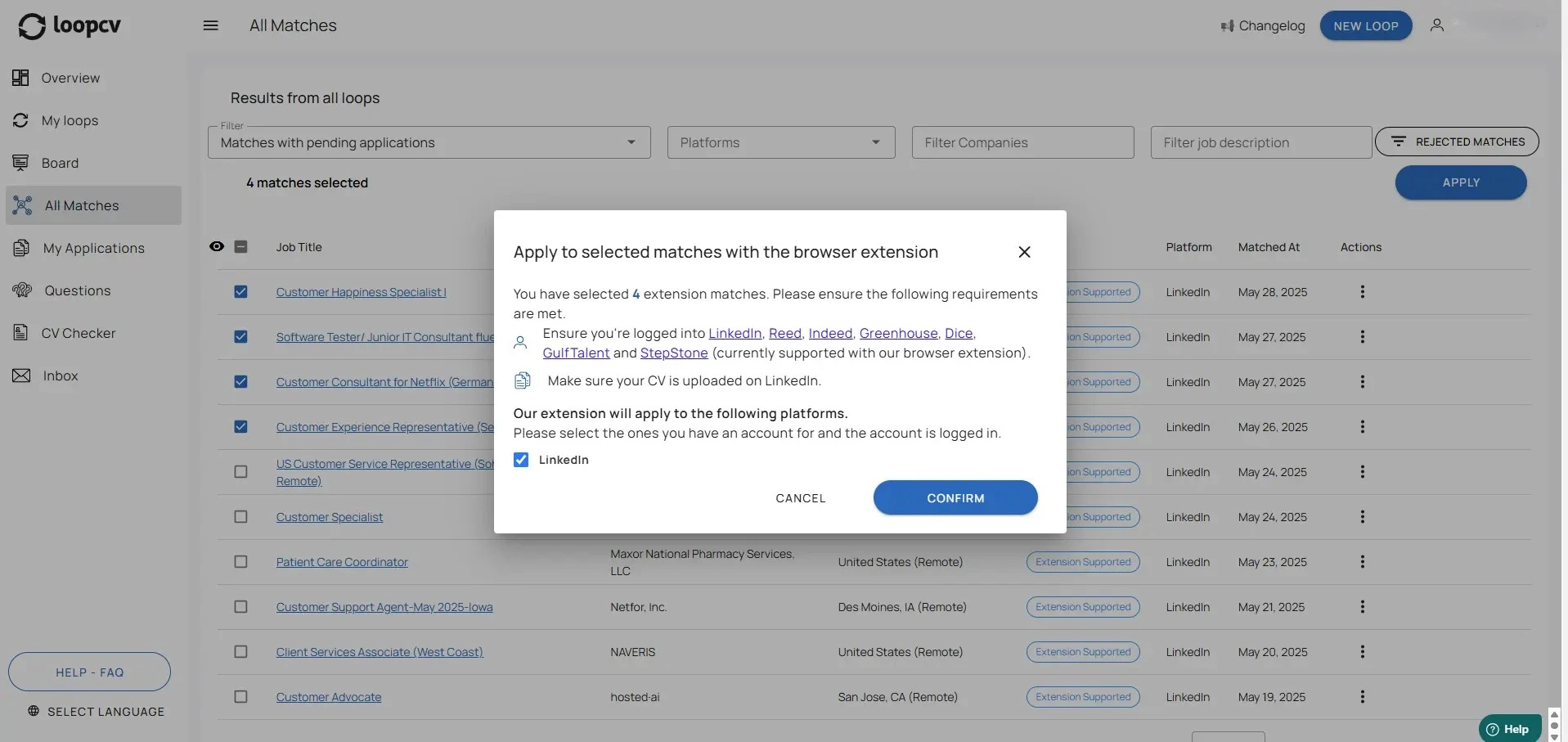
Apply with One Click
Go back to your Loopcv dashboard. Now that the extension is installed and you're logged into the required platforms, reselect the jobs you want to apply for and hit Apply. The extension will take over and automatically submit your applications using the linkedin auto apply bot and our linkedin AI tool.
Start todayLinkedIn auto apply FAQs
Everything you need to know about LinkedIn auto apply. pricing page .
What is the LinkedIn Auto-Apply feature?
LinkedIn Auto-Apply is a Loopcv feature that uses our Chrome extension to submit applications for LinkedIn roles you choose. LinkedIn auto apply is ideal when you want consistent, fast applications with minimal effort.
How does Loopcv auto apply to LinkedIn jobs with the extension?
You select the jobs in your Loopcv dashboard, and the extension completes the application on LinkedIn using the details and CV you’ve already saved in your Loopcv profile. It automates repetitive steps so you can apply efficiently.
Do I need to be logged in to enable the LinkedIn auto apply?
Yes. The extension needs you to be logged in to LinkedIn in your browser so it can submit the application. If you are logged out, Loopcv will prompt you to sign in before continuing.
Can I choose which LinkedIn jobs Loopcv auto applies to?
Yes. You decide which LinkedIn roles to apply to by selecting them in your dashboard. You can also filter and review jobs before starting the application.
Does the extension apply to every LinkedIn job?
The extension works for LinkedIn jobs that support a form-based application flow. If a job requires extra steps that can’t be automated, Loopcv will still collect it so you can apply manually.
Is my LinkedIn data safe?
Loopcv does not store your LinkedIn password. The extension runs in your browser session and uses the information you’ve provided in Loopcv to complete the application securely.
How many LinkedIn job applications can I submit per day?
Your daily volume depends on your plan limits and filters. You can review available limits on our pricing page.
Do I still need to review applications?
You can fully automate or review jobs before applying. If you want extra control, simply keep manual review on and approve the jobs you want.
Can Loopcv answer screening questions with AI?
Yes. Loopcv can generate AI answers for screening questions through our AI Question Answering feature. Learn more on the AI Question Answering page.
Does Loopcv support LinkedIn Easy Apply?
Yes. Loopcv can apply to jobs that support LinkedIn Easy Apply, helping you submit applications faster while keeping control over which roles you apply to.
Does LoopCV work with LinkedIn Easy Apply?
Yes. LoopCV's Chrome extension is specifically designed to automate LinkedIn Easy Apply jobs. When you filter for Extension Supported matches in your dashboard and click Apply, the extension automatically completes the Easy Apply form using the CV and details saved in your LoopCV profile — no manual form-filling required.
Is there a free LinkedIn auto apply bot?
Yes. LoopCV offers a free plan that includes LinkedIn auto apply functionality via the Chrome extension. You can install the extension, connect your LoopCV account, and start auto-applying to LinkedIn Easy Apply jobs at no cost. Free plan users receive a set number of applications per month. Paid plans unlock higher volumes and additional automation features.
What is the difference between LoopCV's LinkedIn extension and full auto-apply?
LoopCV offers two ways to apply automatically. The Chrome extension (used on the LinkedIn auto apply page) lets you select specific jobs in your dashboard and have the extension submit them — you stay in control of which roles are applied to. Full auto-apply runs entirely on LoopCV's servers without any manual selection, scanning job boards daily and applying to every matching role automatically. Both approaches use your saved CV and profile details.
How do I set up LinkedIn auto apply with AI on LoopCV?
To set up LinkedIn auto apply with AI on LoopCV: (1) Create a free LoopCV account and upload your CV. (2) Set up a job search with your target role and location. (3) In your All Matches section, filter for Extension Supported jobs. (4) Click Apply on the roles you want and follow the Chrome extension install prompt. (5) Once installed and logged into LinkedIn, the extension auto-applies using your LoopCV profile. For fully automated daily applications without manual selection, enable Auto-Apply in your job search settings.
Still not convinced? Start with free account!
Loopcv users get in average 50% more interviews and they spend 10 hours less per week.
Start automating your job search today.
No credit card required