Apply to Jobs With One Click — Review First, Apply When Ready
LoopCV finds matching jobs from LinkedIn, Indeed, and 30+ job boards and surfaces them in your dashboard. You review each opportunity and apply to the ones you want — with a single click.
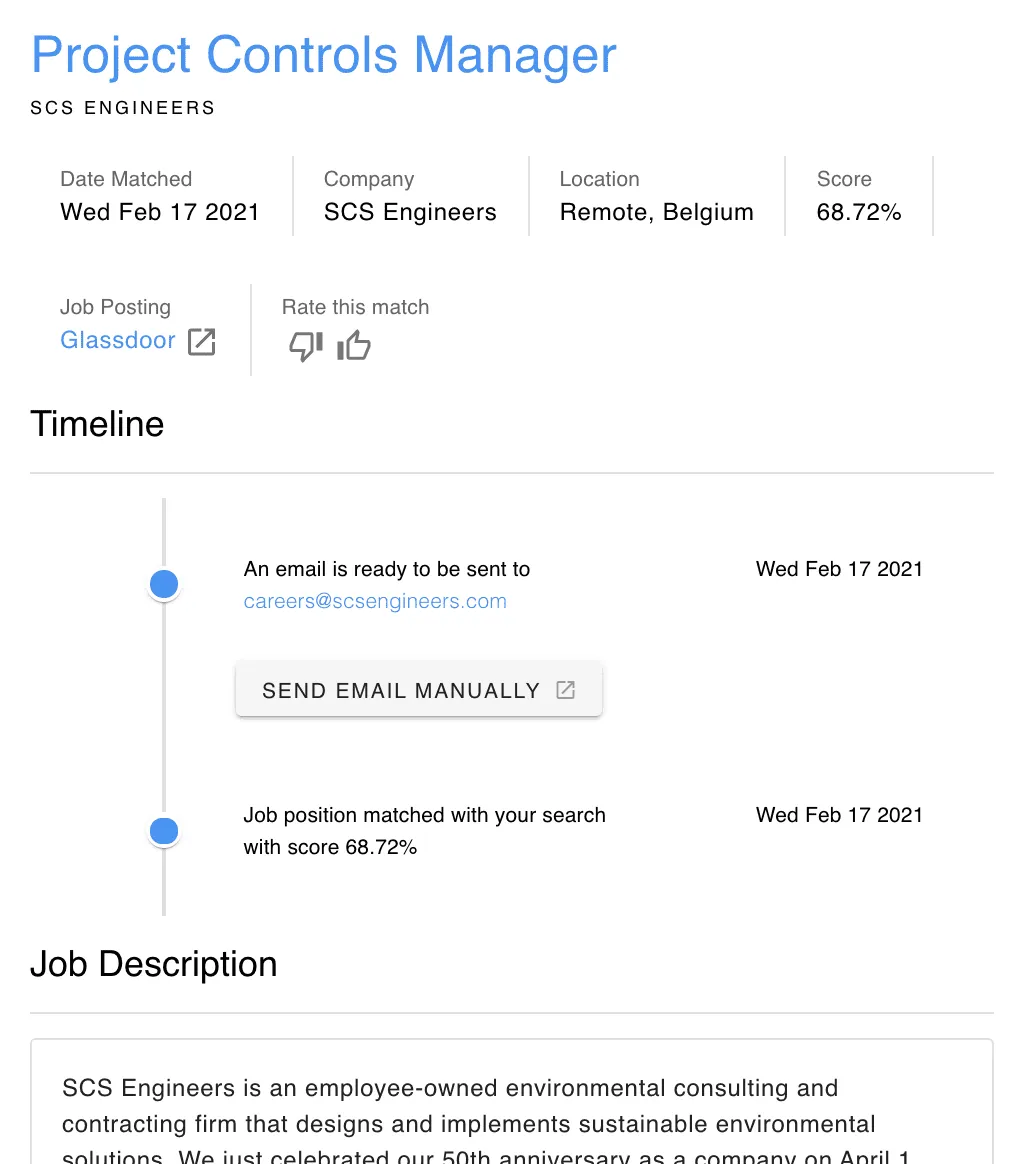
Find more details for each job in a single dashboard.
Send an email to a company with a single click.
For more senior profiles
Screen every job and apply with a single click
- In a single platform you can find all the important details
- You can manually apply with a single click
- You can rate the job matches
Send emails with one click
Loopcv identifies the emails of the companies and with one click you can apply. If you want to spend some more time checking the job now you can do it with the 2 step process.
Rate your job matches
By rating the job matches you help our matching algorithm find you even better matches
Organize your job search
All the interesting positions from multiple job boards can be saved in our dashboard so that you can evaluate them later
Still not convinced? Start with free account!
Loopcv users get in average 50% more interviews and they spend 10 hours less per week.
Start automating your job search today.
No credit card required
Frequently Asked Questions
We’ve got answers. Find more on our support page. .
What are manual job applications?
Manual applications allow you to review your matches and decide which jobs you would like to apply to, instead of having the platform apply automatically on your behalf.
Can I still apply to jobs if auto apply is disabled?
Yes. Even if auto apply is disabled, you can still review your matches and apply manually. For matches that support automated applications or automated emails, you can simply click the “Apply” button to proceed.
How does manual applying work?
You can go through your job matches and click the “Apply” button on the jobs you are interested in. For matches that auto apply is supported, the platform will handle the application process for you, allowing you to apply selectively, one job at a time.
Which jobs can I apply to through the platform?
You can apply directly through the platform only to matches that support automated applications or automated emails. These are jobs where the application process can be completed without leaving the platform.
Why do some jobs require external job application?
Some job listings require additional steps, such as account creation or login credentials on the employer’s website. In these cases, you will need to follow the provided link and complete the application on the original job posting.
What is the difference between One Click Apply and Auto Apply?
Auto Apply lets LoopCV submit applications automatically on your behalf without any action required. One Click Apply gives you full control — you review each matched job first and decide which ones to apply to with a single click.
Is One Click Apply available on all plans?
Yes, One Click Apply is available on all LoopCV plans including the free tier. It is the default mode for users who prefer to review opportunities before applying.
Can I switch between One Click Apply and Auto Apply at any time?
Yes. You can toggle between manual and automatic application modes at any time from your job search settings. Each job search can have its own setting independently.
How does LoopCV find the jobs I review in One Click Apply?
LoopCV continuously scans multiple job boards based on your preferences — job title, location, keywords, seniority, and work type. Matched jobs appear in your dashboard where you can review the full details and apply with one click.
How can I apply to hundreds of jobs quickly without full automation?
With LoopCV's One-Click Apply, you can move through hundreds of job matches rapidly without committing to full automation. LoopCV scans LinkedIn, Indeed, and 30+ job boards daily and collects every role that matches your preferences. You review your dashboard and click Apply on the ones that interest you — applying to each job takes a single click, so you can work through a large volume of relevant opportunities in minutes without sending automated applications to every match.
Is there an AI job tool that lets me choose which jobs I apply to?
Yes. LoopCV's One-Click Apply mode gives you full control over which jobs receive an application. The AI finds and collects matching roles from 30+ job boards every day — but instead of applying automatically, it surfaces them in your dashboard for you to review. You decide which opportunities to pursue and apply to each one selectively with a single click. This is the alternative to Auto Apply for job seekers who prefer to stay in control of their applications.
What does one-click apply mean for job seekers?
One-click apply means that after a job search tool identifies a matching role, you can submit your full application — including your CV and personal details — with a single click, without manually navigating to the employer's website, re-entering your information, or filling out long forms. LoopCV handles the application submission; you just decide which jobs to send it to.
Can I use AI to find matching jobs without applying to all of them automatically?
Yes. LoopCV uses AI to scan job boards and match open roles to your CV and preferences — but applying is optional and selective. If you turn off Auto Apply, LoopCV still finds and collects matching jobs every day and shows them in your dashboard. You can then review each match and choose which ones to apply to. The AI does the discovery work; you make the final call on every application.
How do I apply to jobs on LinkedIn, Indeed, and Glassdoor in one place?
LoopCV aggregates job listings from LinkedIn, Indeed, Glassdoor, and 30+ other job boards into a single dashboard. Instead of opening multiple tabs and re-entering your details on each site, you review all your matches in one place and apply to the ones you want with a single click. LoopCV handles the submission to each platform, so you never have to visit each job board separately.